
Inbox intelligence
Read-only Gmail sync keeps messages, search, attachment access, and manual task creation available on Free. Pro adds summaries, importance, highlights, and automatic task extraction.
Email body and source stay one click away.
Record · Transcribe · Translate
Record the meeting you’re in. DayMarshal transcribes Spanish, French, and Mandarin as people speak, then places a clear English translation beneath every line.
Spanish meetings Filipino meetings French meetings Mandarin Chinese meetings all ten languages
See everything DayMarshal doesRecorded openly in DayMarshal. Fictional conversation.
See the signal
Important requests and deadlines surface without inbox archaeology.
Keep the decision
Meeting outcomes stay connected to the transcript that supports them.
Move the commitment
Follow-ups become owned, dated work instead of disappearing after the call.
Start with clarity
Your brief, calendar, and task standing meet in one calm view.
The working product
DayMarshal does more than produce summaries. It keeps the source, the outcome, and the next action close enough to move together — in the browser at your desk, and in the app in your pocket.
Read-only Gmail sync keeps messages, search, attachment access, and manual task creation available on Free. Pro adds summaries, importance, highlights, and automatic task extraction.
Email body and source stay one click away.
Combine events from multiple Google accounts and selected calendars with your DayMarshal task deadlines in one personal view.
Google events remain read-only.
Organize work on a flexible Kanban board with priorities, labels, due dates, checklists, sharing, and direct references back to email or meeting sources.
Move the task without losing the why.
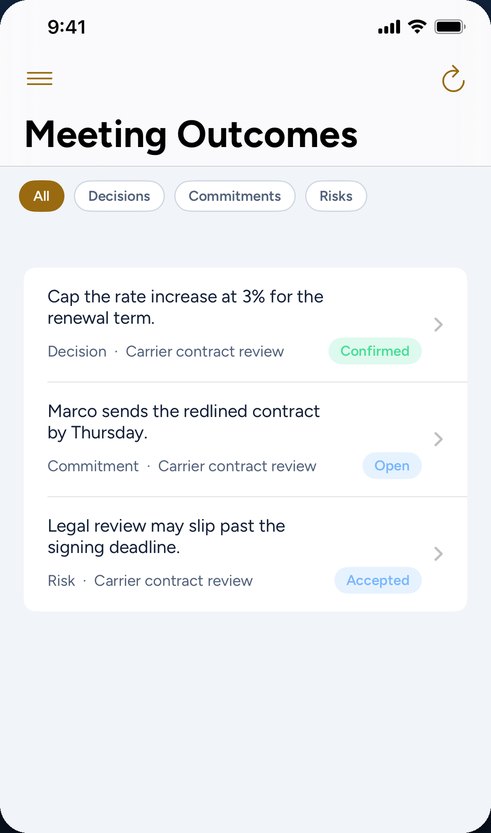
Decisions, commitments and risks come out of the meeting with their own lifecycles. The People page gathers what each person still owes you, across every meeting, and an open promise past its date is chased once — inside working hours, never team-wide.
Nothing is ever marked missed automatically.
Group an effort with its tasks, meetings, outcomes and notes. Set a task to repeat daily, weekly, monthly or every working day. See the same work as a board, a calendar, or a timeline.
A weekly review accounts for the week you actually had.
Meetings that produce action
Send a visible notetaker to a Zoom, Google Meet, or Microsoft Teams call, record an in-person conversation from the iPhone or Android app, upload a recording, or paste a transcript.
Go-to-market review
Zoom · 42 minutes · Private
Summary
The team kept the September launch date and agreed to narrow the first rollout to two regions. Finance will confirm the revised acquisition ceiling before creative is released.
Alexandra: Let’s keep the date, start with two regions, and hold creative until Finance confirms the ceiling.
Launch date remains September 15
Finance to confirm acquisition ceiling
Creative timing depends on final forecast
The online notetaker joins only when you send it and remains visible to everyone in the call.
One operating rhythm
Bring in Gmail, selected Google calendars, and the Discord channels you follow.
Choose the online calls that get a visible notetaker, or record and upload meetings yourself.
DayMarshal identifies importance, summaries, decisions, commitments, risks, and required action.
Prioritize tasks, track outcomes, review your brief, and ask grounded questions with source citations.
Tasks
Everything DayMarshal helped you keep moving
Needs sorting
2Confirm renewal owner
Review launch assumptions
In progress
2Approve regional plan
Prepare board update
Done
1Send hiring forecast
Execution stays visible
The task board keeps priorities flexible. The unified calendar puts your own deadlines beside events from multiple selected Google calendars, without giving DayMarshal permission to change those events.
Share deliberately
Hand off work or invite members without turning every personal item into organization-wide data.
Keep the reference
Open retained email and meeting evidence from the task instead of navigating away to reconstruct context.
Grounded search and daily clarity
Search what DayMarshal has retained across email, meetings, tasks, chat updates, and outcomes. Ask a question and get an answer tied to openable sources—not an unsupported guess.
Your dashboard brief and daily digest collect the strongest current signals, while the execution center keeps decisions, commitments, and risks moving after the meeting.
The team kept the September 15 launch date and limited the first rollout to two regions. Creative remains blocked until Finance confirms the revised acquisition ceiling.
Answer based only on the matching records below.
Go-to-market review
Summary and transcript · 18:42
Regional rollout approved
Recorded Tuesday
Integrations
Every connection is optional and personal. DayMarshal requests only what the working feature needs.
Free read-only sync, retained bodies, search, attachment access, and manual tasks. Pro adds summaries and automated triage.
Multiple Google identities and selected calendars combined with task deadlines.
Per-user authorization for an attributed, visible notetaker sent to a call you choose.
Send the visible notetaker to a Meet link without connecting a Meet account.
Send the visible notetaker to a Teams link without connecting a Teams account.
Link only the channels you follow for personal catch-up summaries and directed tasks.
One account, three clients
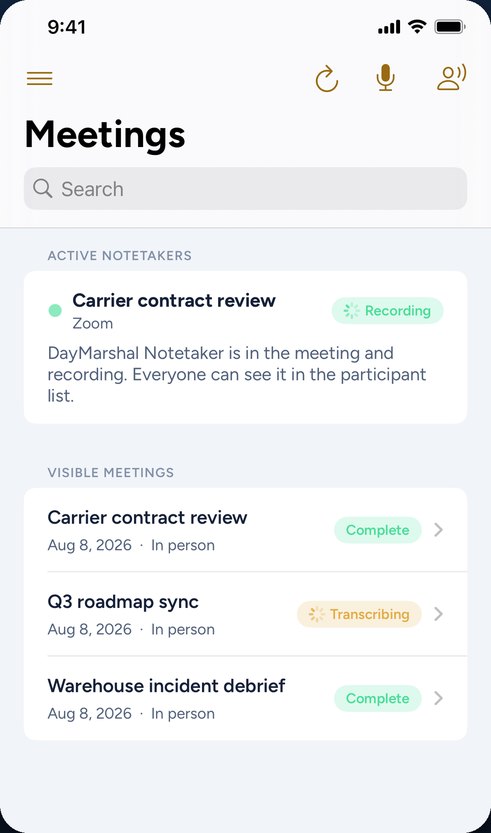
DayMarshal for iPhone and Android records the conversations that never had a dial-in, with live captions and translation as people speak. Meetings, outcomes, and tasks are the same on every screen, because it is the same workspace.
Simple individual pricing
Your Pro allowance follows you across every workspace. Included usage is clear; AI is never advertised as unlimited.
$0
Manual tasks, collaboration, read-only calendars, Gmail sync with retained messages and attachments, keyword search, and 100 MB of private task attachments.
$20 / month
All Pro features with 5 GB of task attachments, 3,000 email analyses, 180 transcription minutes, and included monthly brief, digest, and grounded-answer usage. $200/year.
The trial includes 1 GB of attachments and 700 email analyses. Optional top-ups: 180 transcription minutes or 1,000 email analyses.
Temporary Google review restriction: Free includes ongoing synchronization and access for Gmail accounts already connected, but starting a new Gmail connection currently requires an active Pro trial, paid Pro, or complimentary Pro. Google Calendar is unaffected.
Private by design
Mailbox, calendar, Zoom, and linked-chat data stay scoped to the member who connected them—even inside a shared organization.
OAuth tokens and sensitive remote identifiers are encrypted at rest and removed when their connection is disconnected.
Meetings arrive private. Their owner chooses whether to share them with the organization, and source access follows that visibility.
The online notetaker is visibly named “DayMarshal Notetaker,” joins only when sent, and can be removed by meeting participants.
Email bodies and transcripts remain available for verification until the user removes the source or disconnects the mailbox.
After an online transcript is retrieved, DayMarshal instructs the meeting-bot provider to delete its recording data.
Resources
Meetings
A machine translation of a meeting is genuinely useful and genuinely limited, and most of the trouble comes from not knowing which of the two you are relying on.
Meetings
The usual fix is to make everybody speak the second-best language they have. It is also the reason the meeting produces worse decisions than the people in it are capable of.
Productivity
Not everything deserves a project. Creating one too early adds ceremony to work that did not need it; too late means nobody can see how the pieces connect. Here is the line.
A clearer day starts here
Start with the free command center, then add Pro when the automation earns its place.
Start free